Information Computer

Showing posts with label networking. Show all posts

Saturday, January 28, 2012

Network Monitoring Software

protecting the valuable information it is very important. much less information is highly confidential for many people. on a network term that hackers and others familiar things. is therefore very important for us to keep the information we have on the network with network monitoring software.

network monitoring software is usually used to check or Monitor state-owned network that any data sent to the destination and the absence of data theft is often called by sniffing. therefore the network monitoring software can also save the data we have from hackers or sniffer.

I do not know how the network monitoring software which is great to use but maybe I have a bit of advice / recommendation from me on behalf of the network monitoring software. there are 2 network monitoring software that you can use.

1. Net Tools 5

Net tools 5 is a network monitoring software that I have a lot of features. so complete network monitoring software also has features that lead to hacking equipment. very friendly interface that makes us easy to use. please your own experiment with this network monitoring software.

2. MyLanViewer

MyLanViewer is a network monitoring software that also allow you to monitor your network. MyLanViewer you can use for network scanner and IP monitor for your network. This software is suitable for you who are in the development of network science like me. as well as network monitoring software that had been MylanViewer also have a user-friendly interface. so it is very easy for you to try yourself.

hopefully useful for you. thank you very much and good luck.
READ MORE >> Network Monitoring Software

Saturday, January 21, 2012

Packet Tracer Tutorial

Packet Tracer Tutorial
packet tracer tutorial is here. packet tracer tutorial here, although not perfect, but with time I will complete this blog with a lot of tutorial packet tracer. packet tracer is software that helps us in designing a network. packet tracer tutorial so this may be needed by some people who are learning the network or packet tracer.

packet tracer tutorial here can be found in http://computer-unu.blogspot.com/search/label/packet tracer. hopefully this useful tutorial packet tracer

search for :

tutorial packet tracer

READ MORE >> Packet Tracer Tutorial

Monday, January 16, 2012

DHCP Server [Packet Tracer]

DHCP is a service that automatically assigns IP numbers to
computers that request it. Computers that request IP addresses are DHCP client and a computer that provides the IP address is called DHCP server. Thus, administrators no longer need to manually provide the IP address but simply pass a reference to the DHCP server. IP address is given along with the subnet mask and default gateway.
because DHCP is one of the tasks from the server, then we need a computer server. what you already know what a computer server?

server is a computer (or a computer system) whose job it is to serve other computers. Of course, computers are serviced computers connected to the server. Thus, the server computer can function as:

- Site intenet or science
- Storage of data or files, and create a data or file can be retrieved when needed.
- Connect to the client computer to the Internet.

Many people who try to define the meaning of the word / term in conjunction with a computer server. Here are some definitions:

- The server is a computer on the Internet or on any other network that stores files and make the file available to be taken if needed.
- The server is a computer network applications that are used to serve many users in one network.
- The server is a computer system that provides a specific service type within a computer network.

in the presence of a computer server on our network. then the network we can be called by client-server network. client-server so we can interpret as a form of architecture, where the client is a device that receives that will display and run applications (computer software) and server is a device that provides and act as manager of applications, data, and safety.

let's start creating a network with a DHCP server in packet tracer. follow the instructions below.

1. open packet tracer
2. add the server computer, 1 switch and 2 PCs to our network design.

dhcp server

3. connect all the cables. and then set as shown below.
dhcp server

4. double click server0. set manual ip address server with 192.168.2.1 and subnet 255.255.255.0
5. then click config - DHCP. fill Start IP Address and Subnet as shown below.

dhcp server

6. Now the client can begin to ask for the IP address of the server computer. double-click PC0. click Desktop then click DHCP. if the results are as shown below means you have succeeded.

dhcp server

may be useful. thank's :)
READ MORE >> DHCP Server [Packet Tracer]

Saturday, January 14, 2012

Build a LAN with Wireless [Packet Tracer]

if yesterday I had to review about how to build a LAN with a switch or hub. and we already know what a LAN. this time we will also discuss other again. but the difference is now we will use the wireless media.

Wireless is a wireless technology, in this case is to have telecommunications using electromagnetic waves instead of cables. Current wireless technology is growing rapidly, can be seen by naked eye with a growing number of cellular phone usage, but it also develops wireless technology used for Internet access.

Wireless LANs using elektromagetik waves (radio and infrared) to perform data communication channel data from one point to another point without going through the physical facility. This connection uses a specific frequency to distribute the data, most of the Wireless LAN using a frequency of 2.4 GHz. Frequency is called the Industrial, Scientific and Medical Band or often called the ISM band.

A wireless access point is a wireless networking device that connects wireless clients (such as a computer equipped with a USB wireless adapter or a laptop equipped with ExpressCard wireless adapter) with a wired network is usually also can connect to the internet through it.

now its time to build a wireless LAN simulations with Packet Tracer. follow these instructions:

1. open Packet Tracer
2. click icon wireless devices , then click AccessPoint-PT. add to your worksheet.
3. double click accesspoint0 , click tab config. change the SSID on port 1 with "computer-unu"


4. then add PC devices to your work sheet.
5. double click PC0. in tab physical turn off power. then change module fast-ethernet with Linksy-WM300. note the picture below.

6.copy PC0 and design your network like this.

7. connect all PCs with a wireless access point. see the following figure.


8. and thus as follows.

9. all PCs are connected now live set IP for each PC.
PC0
IP address 192.168.2.1
subnet 255.255.255.0

PC1
IP address 192.168.2.2
subnet 255.255.255.0

PC2
IP address 192.168.2.3
subnet 255.255.255.0


From Wikipedia! 

A local area network (LAN) is a computer network that interconnects computers in a limited area such as a home, school, computer laboratory, or office building. The defining characteristics of LANs, in contrast to wide area networks (WANs), include their usually higher data-transfer rates, smaller geographic area, and lack of a need for leased telecommunication lines.


ARCNET, Token Ring and other technology standards have been used in the past, but Ethernet over twisted pair cabling, and Wi-Fi are the two most common technologies currently used to build LANs.
READ MORE >> Build a LAN with Wireless [Packet Tracer]

Friday, January 13, 2012

build a LAN with a switch / hub [Packet Tracer]

LAN (local area network) is a computer network whose network covers only a small area, such as campus computer networks, buildings, offices, in homes, schools or smaller. Today, most LAN technology based on IEEE 802.3 Ethernet using switch, which has a data transfer speed 10, 100, or 1000 Mbit / s. In addition to Ethernet technology, the current 802.11b technology (or so-called Wi-Fi) is also often used to form the LAN. Places that provide LAN connectivity with Wi-Fi technology called hotspots.

But this time we will not discuss about WiFi or Hotspot. in this post we would design a simple LAN network using a switch / hub in packet tracer. actually post this time is almost equal to that post yesterday about the peer-to-peer. networks can also be made ​​of this we call the peer-to-peer as well. the difference here now we are using a device called a switch / hub.

switch / hub is a device that brings together the network cables from each workstation, server, or other device. Usually hub-shaped box with a flip-flop lamp used cafe or office network to connect a LAN cable (RJ45). although it actually switch and hub are different.

Switch is a hardware device that allows the distribution of packet data between computers in a network and be able to identify network topologies in many layers so that the packet data can be directly to the destination.

Hub is a simple network devices. Hubs do not manage the flow of data in the network path, so each packet of data that passes through the Hub will be sent (broadcast) to all the ports that are up to the data packet to its destination. It can make the hub into collisions and slow down the network. (Hubs are also commonly known as repeaters)

Hub and Switch the difference lies on how the packet data / information sent to them are processed. When data is entered or come to the Hub, Hub will take this data and will be transmitting it to each computer connected to the network.

But that's not the switch, he will receive the data, and will only send it to the computer receiving the data concerned.

Switch will cut the use of your network bandwidth usage significantly, especially when we have a network with many computers and all busy to send and receive data at the same time. Another advantage is that data switches will be more secure from data theft by sniffer.

Switch and Hub actually has the same function, because by using one of which we still can make the Network Computer, but the use of switches will be faster than a network hub, especially if we have a very large.

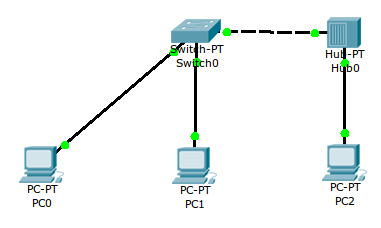
Now let's start creating a network design. follow the instructions below.

1. in the previous post we have been able to add devices PC (personal computer). Now let's add 3 PCs
2. we add a switch device (CTRL + ALT + S). then select the switch with the type "Switch-PT".


3. then add 1 device switches (CTRL + ALT + U). then select the hub with the type of "Hub-PT".


4. then plug the cable to be a design like this.


5. make sure the indicator light is green wires.
6. set the IP address and subnet each PC as follows. if you do not know how to set the IP address and subnet in packet tracer please read my post first peer-to-peer.

PC0
IP address 192.168.2.1
subnet 255.255.255.0

PC1
IP address 192.168.2.2
subnet 255.255.255.0

PC2
IP address 192.168.2.3
subnet 255.255.255.0


8. Now we will test the connection in the network we have created. click tool "add simple PDU" in the right side of the worksheets.


9. click PC0 and PC1, PC0 and PC2, PC1 and PC2.
10. if successful will appear like this. in the lower right corner of the software packet tracer


From Wikipedia! 

A local area network (LAN) is a computer network that interconnects computers in a limited area such as a home, school, computer laboratory, or office building. The defining characteristics of LANs, in contrast to wide area networks (WANs), include their usually higher data-transfer rates, smaller geographic area, and lack of a need for leased telecommunication lines.


ARCNET, Token Ring and other technology standards have been used in the past, but Ethernet over twisted pair cabling, and Wi-Fi are the two most common technologies currently used to build LANs.
READ MORE >> build a LAN with a switch / hub [Packet Tracer]

Thursday, January 12, 2012

Peer-to-Peer [Packet Tracer]

This post begins our discussion of software packet tracer. later we will learn together to discuss many things about the network with packet tracer software. for the uninitiated, is a packet tracer network simulation software manufacture. we try to start making the network simple sanat. commonly called a peer-to-peer. I think peer-to-peer is a type of network in which two or more computers connected to each other and each computer has the same level of network usage.

now let's get started. follow the instructions below.
1. open software packet tracer
2. click End Devices icon (lower left corner) or press CTRL + ALT + V
3. drag icon general (Personal Computer) and drop to worksheets.

packet tracer

4. click Connections icon or press CTRL + ALT + 0 , then click Automatically Choose Connection Type.
5. click PC0 then click PC1.

6. double click PC0.
7. Desktop tab, then click IP Configuration.
8. set IP Address for Subnet Mask.
IP Address PC0 = 192.168.2.1
Subnet Mask = 255.255.255.0

packet tracer

9. close window PC0
10. double click PC1
11. Desktop tab, then click IP Configuration.
12. set IP Address for Subnet Mask.
IP Address PC0 = 192.168.2.2
Subnet Mask = 255.255.255.0
13. Desktop tab, then click Command Prompt
14. type ping 192.168.2.1 then enter
15. if it appears as shown below, it means PC0 and PC1 are connected and successful.


sorry if this post is rather confusing. please leave a comment below. thank :)

From Wikipedia! 
Peer-to-peer (P2P) computing or networking is a distributed application architecture that partitions tasks or workloads among peers. Peers are equally privileged, equipotent participants in the application. They are said to form a peer-to-peer network of nodes.


Peers make a portion of their resources, such as processing power, disk storage or network bandwidth, directly available to other network participants, without the need for central coordination by servers or stable hosts. Peers are both suppliers and consumers of resources, in contrast to the traditional client–server model where only servers supply (send), and clients consume (receive).


The peer-to-peer application structure was popularized by file sharing systems like Napster. The concept has inspired new structures and philosophies in many areas of human interaction. Peer-to-peer networking is not restricted to technology, but covers also social processes with a peer-to-peer dynamic. In such context, social peer-to-peer processes are currently emerging throughout society.
READ MORE >> Peer-to-Peer [Packet Tracer]

Tuesday, December 27, 2011

Fix Packet Tracer Fonts in Ubuntu

packet tracer is a software simulation of cisco for learning / designing a network. for me it is very important because software is software that's one software that I need for school. after a few moments ago I decided to move from windows to linux. I need to find some software that I need. one of which is packet tracer.

then i get the installer packet tracer file with the extension. bin. I installed and successfully. after I noticed something strange on the font. I am handy tips for those of you who have problems like me. there are 2 ways completion.

first way

1. open terminal
2. sudo apt-get install ttf-mscorefonts-installer

second way

1. open terminal
2. sudo apt-get install libqtwebkit2.2-cil libqt4-script libqt4-qt3support libqt4-sql
3. sudo gedit /usr/local/PacketTracer5/packettracer
4. put a # in front of the line export LD_LIBRARY_PATH = $ PTDIR / lib

The second way gives fonts better than if you use the first way. both methods require an internet connection. if your ubuntu are not connected to the Internet. you have to do is download the following package of libqtwebkit2.2 4-cil, libqt4-script, libqt4-qt3support and libqt4-sql package along with its dependencies.

I recommend you download the package-package by using qdebdownloader. because qdebdownloader helps you to download all the dependencies package from the package you are looking for. then install it offline all packages with the command dpkg-i *. deb in the directory containing the package-package. then do step 3 and 4 on the second way. if you have any questions please leave your comment. hopefully useful:)
READ MORE >> Fix Packet Tracer Fonts in Ubuntu

Monday, August 22, 2011

Set DNS Client / IP Name Server

if we create a local network that there is a computer server and local web server. certainly you will also configure the DNS server so that web can be accessed using the domain name (eg google.com).

I did not explain how to configure a DNS server. this post I want to share a settlement of the problems I've ever experienced in practice the DNS server. after the DNS server has been configured. You also must set up the DNS client. Generally, we only need to enter DNS server IP. Different operating systems are also different way. if in our windows facilitated by a GUI (Graphic User Interface) is very friendly. in linux there were also some who have been using the GUI. but sometimes there is little constraint on linux.

problem is that sometimes not all network devices detected in the GUI. only detected if we use the command ifconfig. therefore we need a way of manually setting up the DNS client. this way.

1. open terminal

2. vi /etc/resolv.conf

3. add the text below

search yourdomain.com

nameserver ipnameserver

example :

search google.com

nameserver 192.168.2.1

4. save

5. check with command nslookup

example :

nslookup google.com


need to know! 
In the context of client-server architecture, a server is a computer program running to serve the requests of other programs, the "clients". Thus, the "server" performs some computational task on behalf of "clients". The clients either run on the same computer or connect through the network.

In most common use, server is a physical computer (a hardware system) dedicated to running one or more such services (as a host), to serve the needs of users of the other computers on the network. Depending on the computing service that it offers it could be a database server, file server, mail server, print server, web server, or other.

In the context of Internet Protocol (IP) networking, a server is a program that operates as a socket listener.

Servers often provide essential services across a network, either to private users inside a large organization or to public users via the Internet. For example, when you enter a query in a search engine, the query is sent from your computer over the internet to the servers that store all the relevant web pages. The results are sent back by the server to your computer.
READ MORE >> Set DNS Client / IP Name Server

Friday, August 19, 2011

Renew IP Dynamic With Command Linux

a time when I tried DHCP on linux debian server. I got a problem. the problem is not on its server. but on his client. client computer using ubuntu linux 11.04. the problem is when the DHCP server has been completed the client computer can not renew its IP with the IP that is given by the server.

I try to set in the edit connection. but to no avail. I have to browse the final choice to solve this problem. I have tried a few keywords. from keyword "DYNAMIC IP" to "HOW TO ADJUST THE DYNAMIC IP" and everything nothing works. until the end I was dragged into a forum to discuss Linux. and that's where I found the answer.

turned out to renew dynamic IP obtained from DHCP server. requires only a very simple command. The following command syntax to renew dynamic IP.

#dhclient interfaces

example :

#dhclient eth0

This command is valid only in the root user. if you have not as root you need to login as root with the following command.

$sudo su

or

$su root

or you can also command the following for brevity

$sudo dhclient interfaces

example

$sudo dhclient eth0

good luck and thank :)

need to know! 
An Internet Protocol address (IP address) is a numerical label assigned to each device (e.g., computer, printer) participating in a computer network that uses the Internet Protocol for communication. An IP address serves two principal functions: host or network interface identification and location addressing. Its role has been characterized as follows: "A name indicates what we seek. An address indicates where it is. A route indicates how to get there."

The designers of the Internet Protocol defined an IP address as a 32-bit number and this system, known as Internet Protocol Version 4 (IPv4), is still in use today. However, due to the enormous growth of the Internet and the predicted depletion of available addresses, a new addressing system (IPv6), using 128 bits for the address, was developed in 1995, standardized as RFC 2460 in 1998, and is being deployed worldwide since the mid-2000s.

IP addresses are binary numbers, but they are usually stored in text files and displayed in human-readable notations, such as 172.16.254.1 (for IPv4), and 2001:db8:0:1234:0:567:8:1 (for IPv6).

The Internet Assigned Numbers Authority (IANA) manages the IP address space allocations globally and delegates five regional Internet registries (RIRs) to allocate IP address blocks to local Internet registries (Internet service providers) and other entities.
READ MORE >> Renew IP Dynamic With Command Linux

Followers